On this pageWhen you need it
The short answer
Sell features and content you unlock in the app with in-app purchase (guideline 3.1.1). On the sign-up screen, show the subscription's name, length and what it includes, the full renewal price, and a way to sign in or restore purchases. Link your Terms of Use and Privacy Policy in the app and in App Store Connect. Make every product reachable in the build, and give the reviewer an account with an expired subscription.
When you have to use in-app purchase
guideline 3.1.1 says that if you want to unlock features or functionality in your app, you must use in-app purchase. Apple's examples are subscriptions, in-game currencies, game levels, premium content and a full version. It also rules out your own unlock tricks, such as license keys, QR codes or crypto wallets.
Physical goods and services used outside the app work the other way round. A ride or a food delivery has to use a payment method other than in-app purchase, according to guideline 3.1.3(e). The rules on linking out to other ways to pay also change by country and storefront, so read the current text of 3.1.1(a) and 3.1.3 for the places you actually sell in.
What the paywall must show
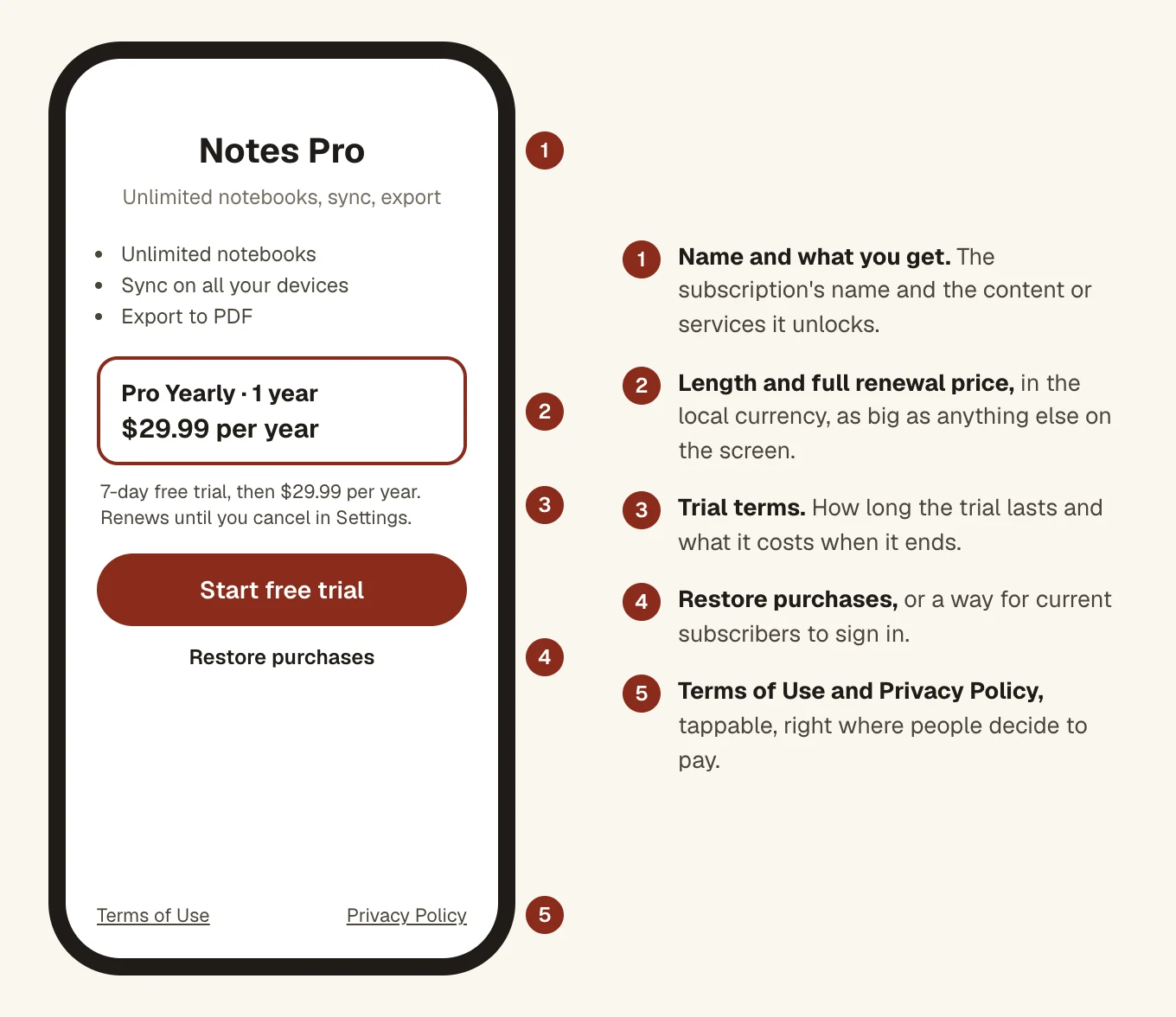
guideline 3.1.2 part (c) says that before asking someone to subscribe, you should clearly describe what they get for the price. Apple's subscriptions page is more exact. It says these details must be on the subscription's sign-up screen:
- The subscription's name and length, and the content or services it gives.
- The full renewal price, shown clearly and prominently, in the local currency.
- A way for current subscribers to sign in or restore purchases.
For a free trial, say how long the trial lasts and the price that will be billed when it ends.
Easy paywall mistakes to make
- A tiny grey renewal price under a giant "Free" or a per-week figure.
- No Restore Purchases or Sign in button on the paywall itself.
- Screenshots and a description that never say which features cost money. guideline 2.3.2 asks the listing to make that clear.
Restore purchases
guideline 3.1.1 says you should have a restore mechanism for any restorable in-app purchase, and the subscriptions page lists "a way for current subscribers to sign in or restore purchases" among the sign-up screen details. Put a Restore Purchases button on the paywall and another in settings. Then test it properly on a second device signed in to the same Apple Account, because it's the button people only press when something has already gone wrong. Apple also notes that purchased credits or in-game currencies may not expire.
Terms of Use and Privacy Policy links
Apple's subscriptions page says your app and your App Store metadata must include links to your Terms of Use and Privacy Policy. Here's where we put them.
- In the app. Both links on or right under the paywall, where someone deciding to pay can tap them.
- In App Store Connect. The Privacy Policy URL field, plus a Terms of Use link. If you use Apple's standard licence agreement, link to it from the app description. If you have your own, add it as the app's licence agreement.
Open every link before you submit. A dead link is a 2.1 problem as well as a 3.1.2 one.
Rules that only apply to subscriptions
- At least seven days. guideline 3.1.2 part (a) says an auto-renewing subscription must last at least seven days and be available on all the user's devices.
- Ongoing value. The same rule says a subscription has to keep giving people something. Charging monthly for a feature that never changes is asking for trouble.
- Account deletion. If people can create an account in the app, they must be able to delete it in the app (guideline 5.1.1). Apple's account deletion page says to tell subscribers that billing carries on through Apple and to ask them to cancel first.
Make the purchases easy to review
Guideline guideline 2.1 part (b) says in-app purchases must be complete, up to date, visible to the reviewer and working, and that you should explain in the notes any product the reviewer can't find. Before you submit:
- Attach every new product to the version you send, with its review screenshot and notes filled in.
- Buy each one with a sandbox tester in the exact build you upload.
- Give a demo account with an expired subscription, as Apple's review help page asks, so the reviewer can go through the whole purchase.
- Tell the reviewer where the paywall appears. "Tap Pro in Settings, or try to export a third file."
Our guide to guideline 2.1 covers demo accounts and notes in more detail.
How often purchase rules cause rejections
The Business section of the rules, where 3.1.1 and 3.1.2 live, is still smaller than Performance. But it's growing fastest.
Rejections citing the Business section
Section 3: in-app purchase and subscriptions
Business was cited in 283,820 rejections in 2025, up from 209,845 in 2024, according to Apple's transparency report. See why Apple rejects apps for the full breakdown.
Questions people ask
Do I have to add a Restore Purchases button?
Apple's guideline 3.1.1 says you should have a restore mechanism for restorable purchases, and its subscriptions page lists a way to sign in or restore purchases among what the sign-up screen must include. A visible Restore button on the paywall covers both.
Where do the Terms of Use and Privacy Policy links go?
In both places. Apple's subscriptions page says the app and the App Store metadata must link to them. Put them on the paywall in the app, and in App Store Connect use the Privacy Policy URL field plus a Terms of Use link.
What is the shortest subscription Apple allows?
Seven days. Guideline 3.1.2(a) says an auto-renewing subscription must last at least seven days and be available on all of the user's devices.
What does the reviewer need to test a subscription?
A demo account with an expired subscription, so they can buy it again, plus every product attached to the version and reachable in the build. If a product can't be found, explain why in the review notes.
Do I need to show the price after a free trial?
Yes. Apple's subscriptions page says the purchase flow for a free trial should clearly show how long the trial lasts and the price billed once it is over.