
On this pageWhat asc is
The short answer
asc is a free, open source command line tool for App Store Connect (MIT licence, written in Go, by Rork, not affiliated with Apple). Install it with brew install asc, sign in with an App Store Connect API key, and you can pull your listing into files, check it with asc validate, find review blockers with asc review doctor, and upload and submit builds from a script.
What asc is
App Store Connect CLI wraps Apple's App Store Connect API in one command, asc. It handles apps, builds, TestFlight, metadata, screenshots, signing, submission and review status. In a terminal it prints tables. When you pipe it or run it in CI it prints JSON, which makes it easy to script, and easy for an AI agent to read.
On 11 November 2026 the repository had 8.3k stars and was on release 6.6.1. The README says it's an independent, unofficial tool and not affiliated with Apple.
Install and sign in
The README gives Homebrew as the main install, plus an install script for macOS and Linux:
brew install asc
# or
curl -fsSL https://asccli.sh/install \
  | bash
Sign-in uses an App Store Connect API key. You create one in App Store Connect under Users and Access, then Integrations. You'll need the key ID, the issuer ID and the .p8 file you download once:
asc auth login --name "MyApp" \
  --key-id "ABC123" \
  --issuer-id "DEF456" \
  --private-key ~/keys/AuthKey.p8
asc auth status --validate
Give the key the least access that covers what you run, and keep the .p8 out of your repository. Apple only lets you download it once.
The commands we actually use
| Command | What it does |
|---|---|
asc builds list --app ID | Lists uploaded builds and their state. |
asc metadata pull | Writes the listing (name, subtitle, description, keywords, URLs) into JSON files. |
asc metadata plan / apply | Shows the changes your files would make, then makes them. |
asc metadata keywords audit | Finds repeated keywords, overlap with the name and subtitle, and unused characters. |
asc validate --app ID --version 1.2.3 | A readiness report before you submit: length limits, placeholder text, missing fields, with the next fix first. |
asc review doctor --app ID | Explains why a version can't be submitted yet. |
asc publish appstore | Uploads an .ipa, attaches it to the version and submits it. |
asc status --app ID --until review-done | Waits for the review result. Exits 0 if approved, 1 if rejected. |
If you only try one, make it validate. Here's what it said about our own app's 1.0.0 on the day we wrote this.
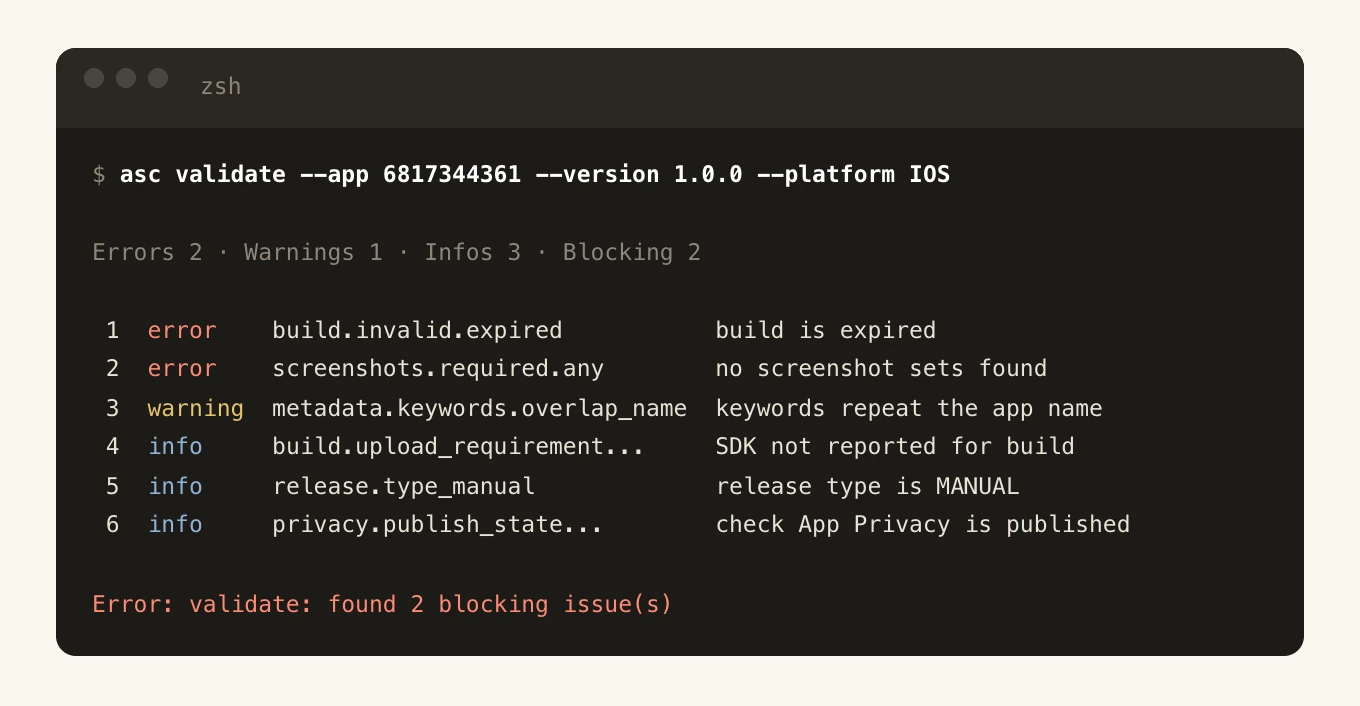
asc validate run, 11 November 2026. Trimmed to fit, with the long resource IDs removed. Two blockers. The build attached to the version had expired, and we hadn't uploaded screenshots yet. It also caught our keywords repeating a word from the app name, which wastes some of the 100 characters.Keep your App Store listing in git
The best thing asc did for us was turn the listing into files we review like code.
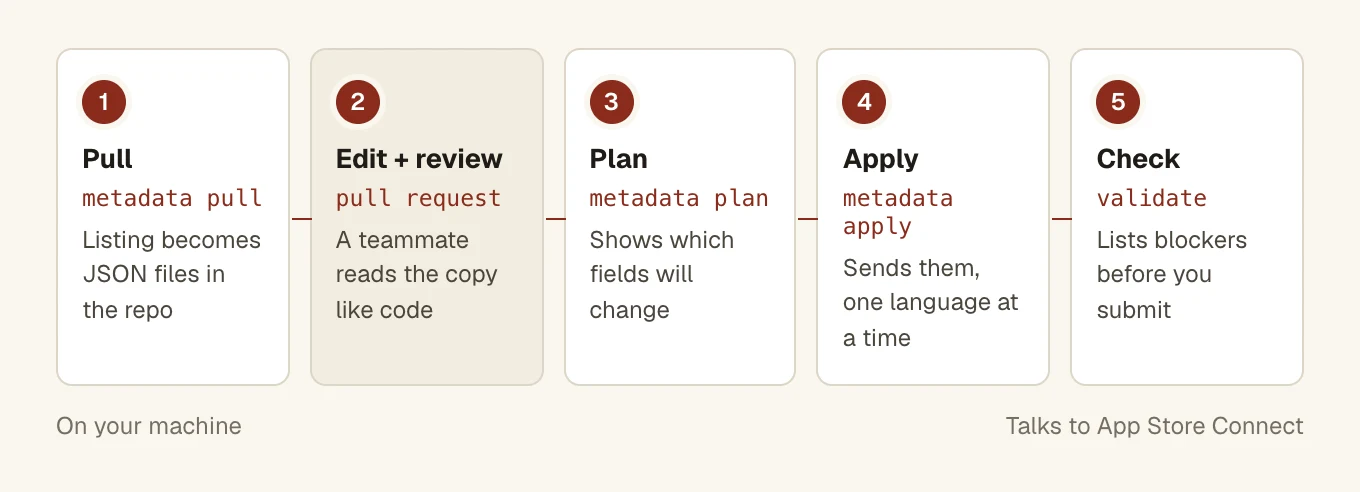
asc metadata pull --app ID --version 1.0.0 --platform IOS --dir app-store/metadatawrites one JSON file for the app info (name, subtitle, privacy URL) and one per version (description, keywords, promo text, support URL).- Edit the files and open a pull request, so a teammate reads the copy before it goes live.
asc metadata planshows exactly which fields change.asc metadata applysends them to App Store Connect.asc validatebefore you submit.
Demo account passwords never sit in the files. pull writes a reference like @env:ASC_DEMO_ACCOUNT_PASSWORD and reads the real value from your environment when you apply.
What went wrong when we used it
We manage the App Store listing for our own iPhone app with asc. Some of this cost us an afternoon.
One refused field blocks the whole language
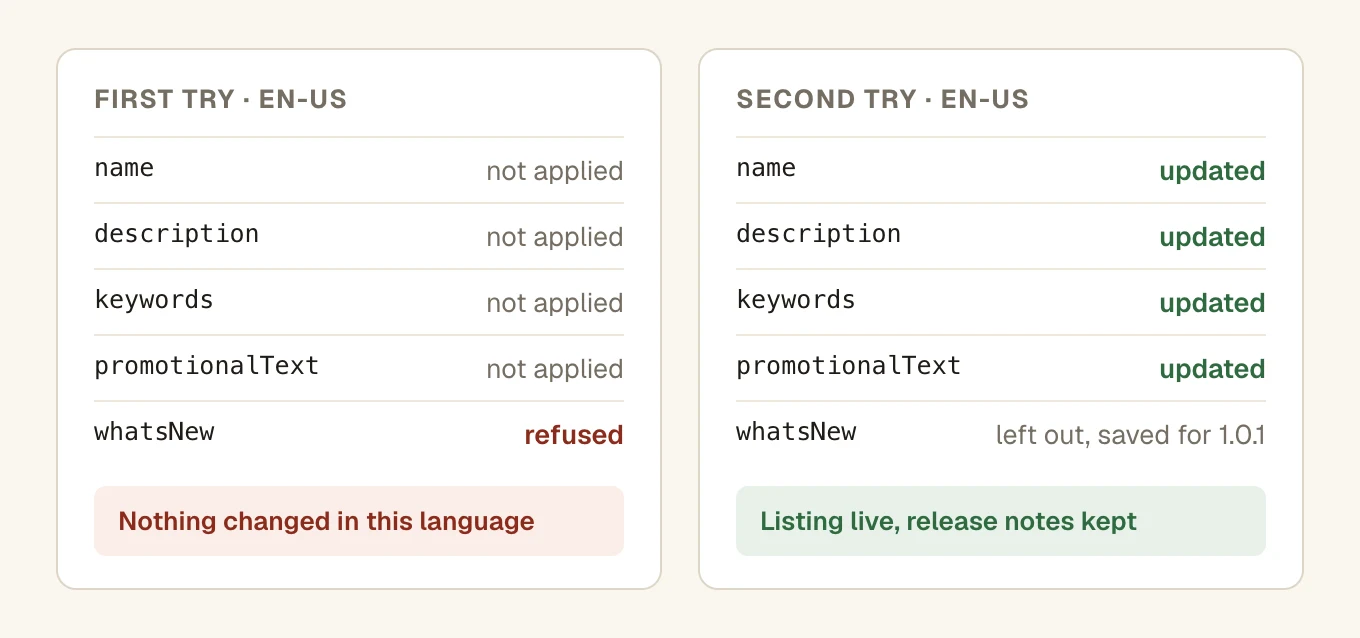
apply updates a localization in one go. When App Store Connect refused one field, none of the other fields for that language changed either. The fix is to read the error, take out or fix that one field, and apply again.
What's New can't be set on a first version
This is the field that bit us. App Store Connect doesn't allow release notes on an app's first version, and our files had a whatsNew value. So the whole update failed. We applied from a copy of the files without it and kept the text for the next version.
App names are first come, first served
Our first choice of name was already taken by another app, and App Store Connect refused it. Check the name in App Store Connect before you print it on anything.
Smaller things
- Homebrew can trail the latest release. On release day the Homebrew package was a version behind GitHub. If the README shows a flag you don't have, compare
asc --versionwith the releases page. - Check before you bump the build number. We compare the app's commit history with
asc builds listfirst, so we never upload a new build for code that hasn't changed. - Telemetry is on by default. The README says asc sends pseudonymous command usage. Turn it off with
asc telemetry disableorDO_NOT_TRACK=1.
Where it fits in a release
asc won't tell you what the rules are. It makes checking them quicker and the same every time. We run asc validate and asc review doctor next to our App Store submission checklist. Between them they catch most of what our guides on guideline 2.1 and subscriptions warn about.
Questions people ask
Is asc an official Apple tool?
No. Its README says it is an independent, unofficial tool and not affiliated with Apple. It uses Apple's public App Store Connect API with your own API key.
Is asc free?
Yes. It is open source under the MIT licence, on GitHub.
Do I need a Mac to use asc?
Not for metadata, TestFlight or review status. The install script supports macOS and Linux. You still need a Mac with Xcode to build the app itself.
How does asc sign in to App Store Connect?
With an App Store Connect API key: the key ID, the issuer ID and the .p8 file you download when you create the key. Run asc auth login with those, then asc auth status --validate to check.
Can asc submit my app for review?
Yes. asc publish appstore uploads an .ipa, attaches it to the version and can submit it, and asc status --until review-done waits for the result. Run asc validate first.