Every step from an empty developer account to a live App Store listing, in the order you'll hit them. Each one links to the Apple rule behind it, and the ones marked "We hit this" tripped us up on our own app.
To get an app onto the App Store in 2026 you need a paid Apple Developer account, a build made with Xcode 26 and the iOS 26 SDK, and a complete App Store Connect record. Most rejections come from the same handful of gaps. Check these before you press Submit:
Name, subtitle, description, keywords and a support URL that match what the app does.
Screenshots at the required sizes that show the real app.
A privacy policy link, accurate privacy labels and in-app account deletion.
Review notes and a working demo account if the app has a sign-in.
A crash-free build with no placeholder screens or broken links.
0 of 0 done
Before you build
Accounts, IDs and the rules that decide what the app can be. Fixing any of these later costs far more than doing it now.
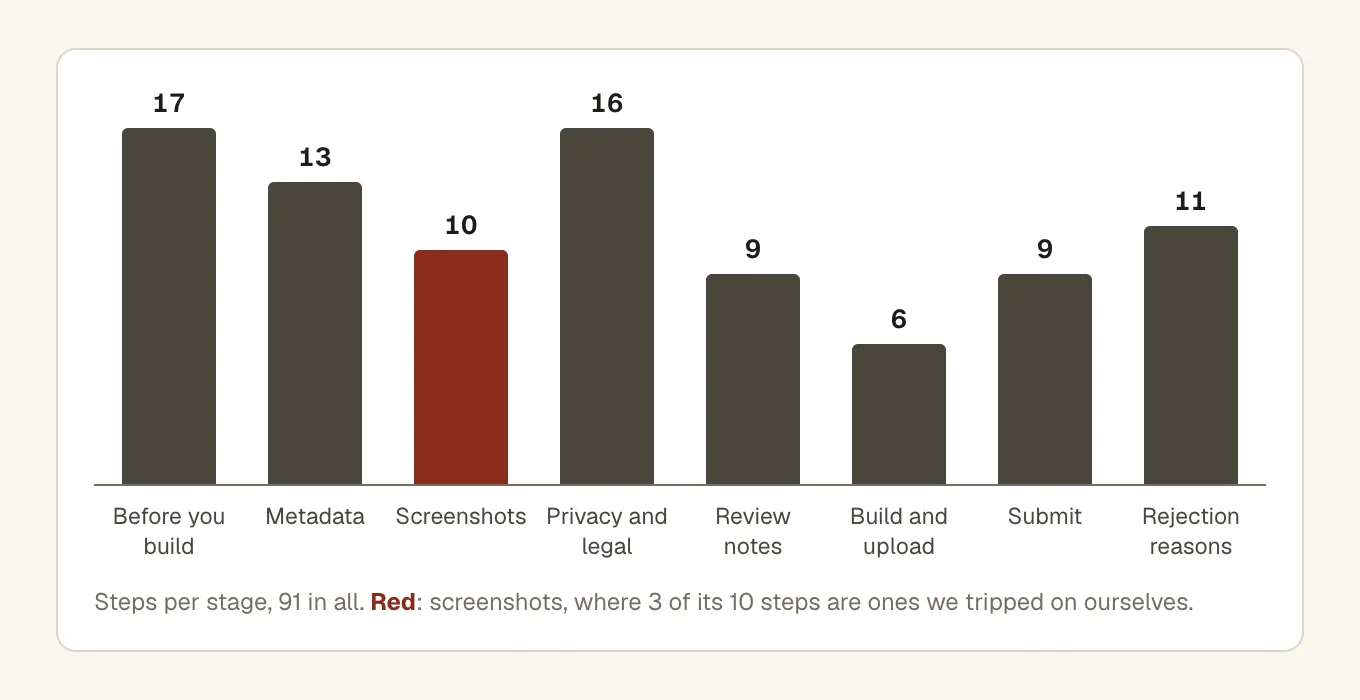
Where the 91 steps sit. 17 of them come before you write much code, and those are the cheapest to get right. Privacy and legal grew most in 2026, with new rules on AI, age checks and medical devices.
All done in this section.
Metadata
The words on your App Store page. The reviewer reads them next to the app and checks they describe the same thing.
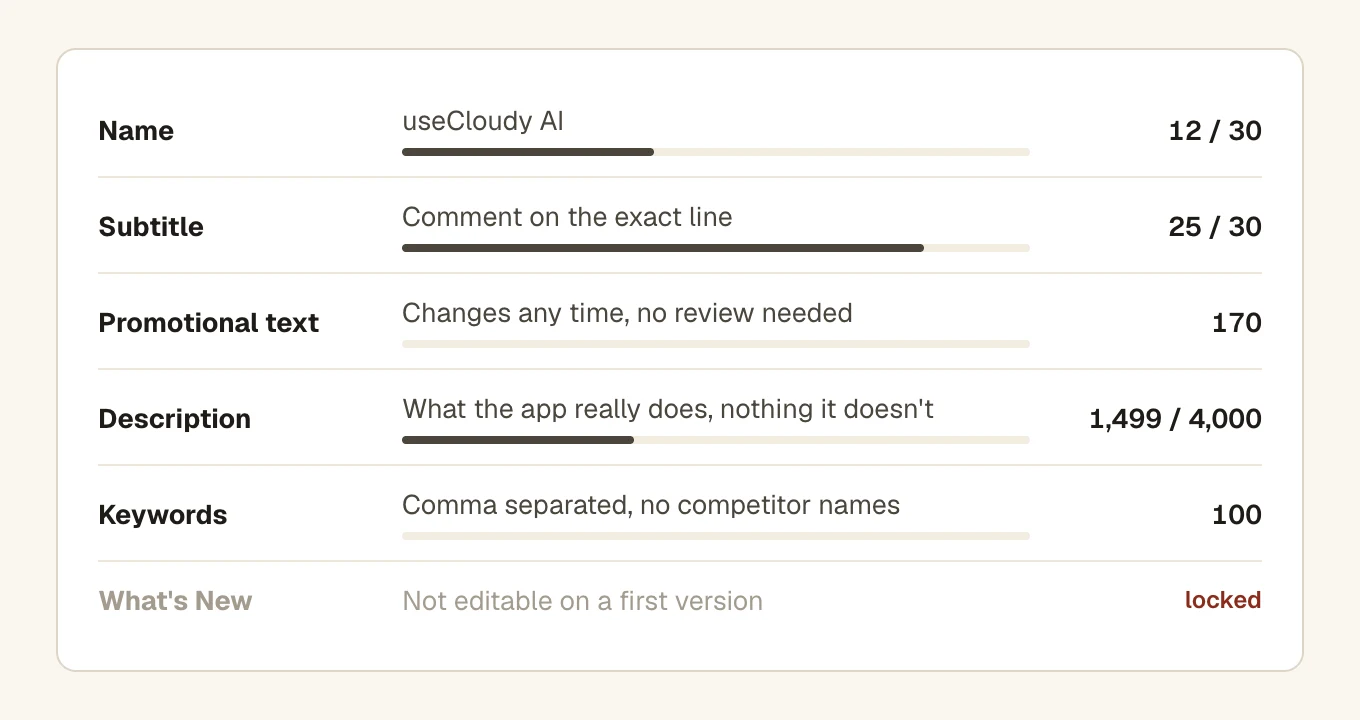
The text fields and their limits, filled with our own 1.0.0 listing. Drawn for this post. What's New stays locked until your first update.
All done in this section.
Screenshots and preview
The first thing reviewers and customers look at, and the section where we made the most mistakes.
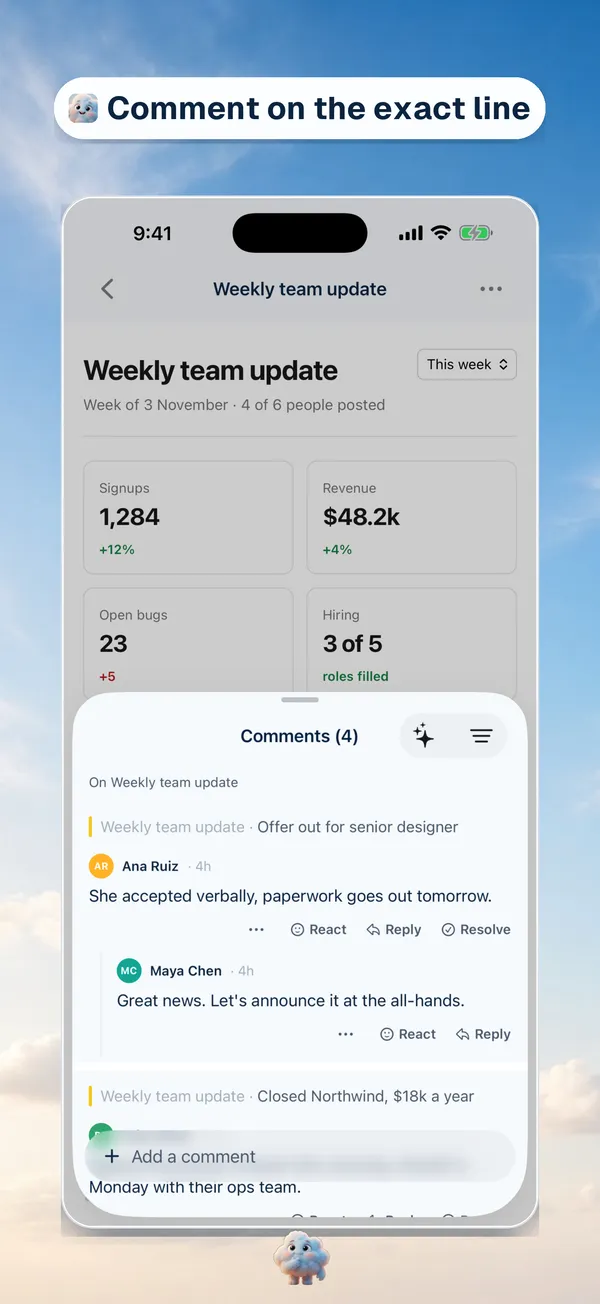
Two of our own large display screenshots, 1320 by 2868. Real screens from the signed-in app with a short line on top, and no debug banners. Three of the steps below are ones we got wrong at first, including the size: Apple now requires the medium display size, 1206 by 2622.
All done in this section.
Privacy and legal
Privacy policy, labels, permissions and account deletion. Most of it lives in App Store Connect, not in your code.
All done in this section.
Review notes and demo account
What you tell the reviewer. If they can't sign in or can't find a feature, the review stops here.
All done in this section.
Build and upload
Getting a clean release build into App Store Connect.
All done in this section.
Submit and after
The last few clicks, and what to do when App Review writes back.
All done in this section.
Top rejection reasons
The reasons apps get sent back most often. Tick each one once you're sure it doesn't apply to yours.
All done in this section.
Questions people ask
How long does App Review take?
Apple doesn't promise a fixed time. Most submissions get a decision within a day or two. A rejection starts the clock again once you resubmit. For a critical bug fix or a launch tied to a dated event, you can ask Apple for an expedited review.
What are the most common reasons apps get rejected?
Crashes and bugs, missing information for the reviewer (most often a demo account), screenshots or text that don't match the app, and privacy gaps such as no privacy policy or no way to delete an account. The top rejection reasons section lists eleven, each linked to the guideline behind it.
Do I need a demo account for App Review?
Yes, if any part of the app needs a sign-in. Put a working username and password in the review notes, as guideline 2.1 asks, for an account with real sample data that won't expire or ask for a two-factor code. Add a second account if the reviewer should try account deletion. A built-in demo mode instead of an account is allowed only for legal or security reasons, and only after Apple approves it.
Can I change my app's name after it's live?
Yes, but only with a new version: App Store Connect lets you edit the name when you create a new version or while a version is still editable. The bundle ID can never change, so choose that one carefully.
Do I need a Mac to submit an iPhone app?
You need Xcode to build and upload, and Xcode runs only on macOS. A hosted Mac build service works too. Everything else, from metadata to screenshots and submitting, happens in App Store Connect in any browser.