On this pageWhat 2.1 says
The short answer
Guideline 2.1 wants the app you submit to be the finished version. That means no crashes, no placeholder text, working links, your back end switched on, and a demo account or demo mode if there's a sign-in. In-app purchases have to be complete and visible to the reviewer. Apple says over 40% of unresolved issues relate to 2.1, so it's worth running these checks before every submission, not just the first.
What guideline 2.1 actually says
guideline 2.1 has two parts. Part (a) says a submission should be the final version with all metadata and working URLs, and that placeholder text, empty websites and other temporary content should be gone. It asks you to test on a device for bugs and stability and to include demo account details if the app has a login. Apple's own phrasing is worth quoting:
"include demo account info (and turn on your back-end service!) if your app includes a login."
That exclamation mark is there for a reason. Then comes the line behind most of these rejections. Apple will reject incomplete app bundles and binaries that crash or show obvious technical problems.
Part (b) covers in-app purchases. They must be complete, up to date, visible to the reviewer and working. If the reviewer can't find a purchase you set up, the review notes are where you say why.
Why 2.1 is the one to worry about
Apple's 2025 transparency report counts 1,354,418 rejections under Performance, the section 2.1 sits in, out of 2,093,244 rejected submissions. The report doesn't split that by rule. Apple's App Review page fills the gap a little: on average, over 40% of unresolved issues relate to 2.1, which Apple describes as crashes, placeholder content, incomplete information and more.
Performance against everything else, 2025
Rejections citing each part of the rules
Our post on why Apple rejects apps has the full three-year numbers.
Test the build the reviewer will get
Most 2.1 problems show up in the reviewer's first minute with your app. You can find them first.
- Test the exact build you upload. A release build behaves differently from the debug build you run all day. Install it through TestFlight and use that.
- Start like the reviewer does. A real device on the current iOS, a fresh install, signed out.
- Tap every link once. Apple wants a working support link with up-to-date contact details and a privacy policy link in every app.
- Search the project for leftovers. "lorem ipsum", "TODO", test buttons, empty tabs, "coming soon" screens.
- Try the unhappy paths. No network, permission denied, a brand new account with no data. A blank screen there looks unfinished to a reviewer.
- Keep the back end up for the whole review, including any staging server the build points at. The guidelines say back-end services should be live and reachable during review.
Give the reviewer a demo account that works
Apple's App Review help page is specific here.
- The username and password must work at the time of submission. Credentials that expire or change before review starts can get the submission rejected.
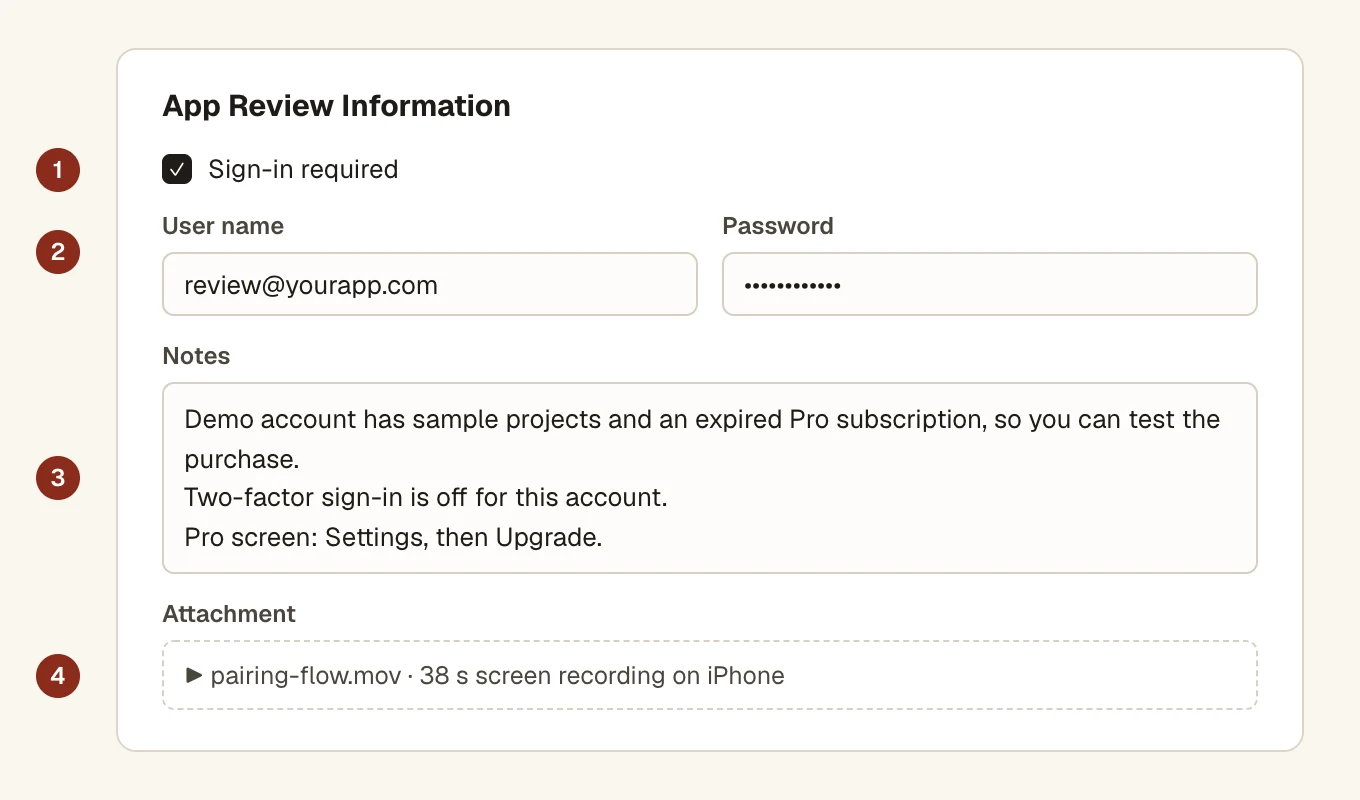
- If the app sells auto-renewable subscriptions, give an account with an expired subscription, so the reviewer can go through the whole purchase.
- If sign-in needs a code as well as a password, put it in the notes up front. Without it Apple may need to set up a call, which typically takes three to five business days.
Three to five days is a long time to lose over a missing code. What we do is make one account just for review, fill it with realistic sample data, turn two-factor sign-in off for it, and leave it alone until the review closes. If the app needs special hardware, a location or an invite before there's anything to see, tell the reviewer how to get past that.
When you can't share an account
Apps that handle sensitive information or work in a highly regulated industry can use a built-in demo mode instead. The guideline says this needs Apple's approval in advance, and the demo mode has to show the app's full features.
When there's no sign-in
Say so anyway. "This app doesn't need an account. Everything is available from the first screen." It saves the reviewer hunting for a login that isn't there.
Write review notes that answer the questions first
The notes field in App Store Connect is your only chance to talk to the reviewer before they start. Apple asks for detailed explanations of non-obvious features and in-app purchases there, with supporting documents where they help. The accurate metadata rule, guideline 2.3, adds that new features must be described specifically in the notes, and generic descriptions will be rejected.
Ours usually covers these, in this order:
- What the app does, in one sentence.
- How to sign in, or "no account needed".
- Where the main features are. "Tap Scan on the home screen, then point at any barcode."
- Anything hidden behind a purchase, a setting or a location, and where each in-app purchase shows up.
- What changed in this version, if it isn't the first.
For a flow that's hard to reach, like pairing a device, a short screen recording made on a real phone beats a paragraph. App Store Connect lets you attach a file to the review information.
In-app purchases have to be reviewable
Part (b) of 2.1 catches apps whose purchases are set up in App Store Connect but don't appear in the build, or appear and then fail. Before you submit, buy each product with a sandbox account in the build you're sending, and make sure each one is attached to the version. If a product can't be reached in this version, say why in the notes. Our subscriptions guide goes through the purchase rules in full.
If you get a 2.1 rejection anyway
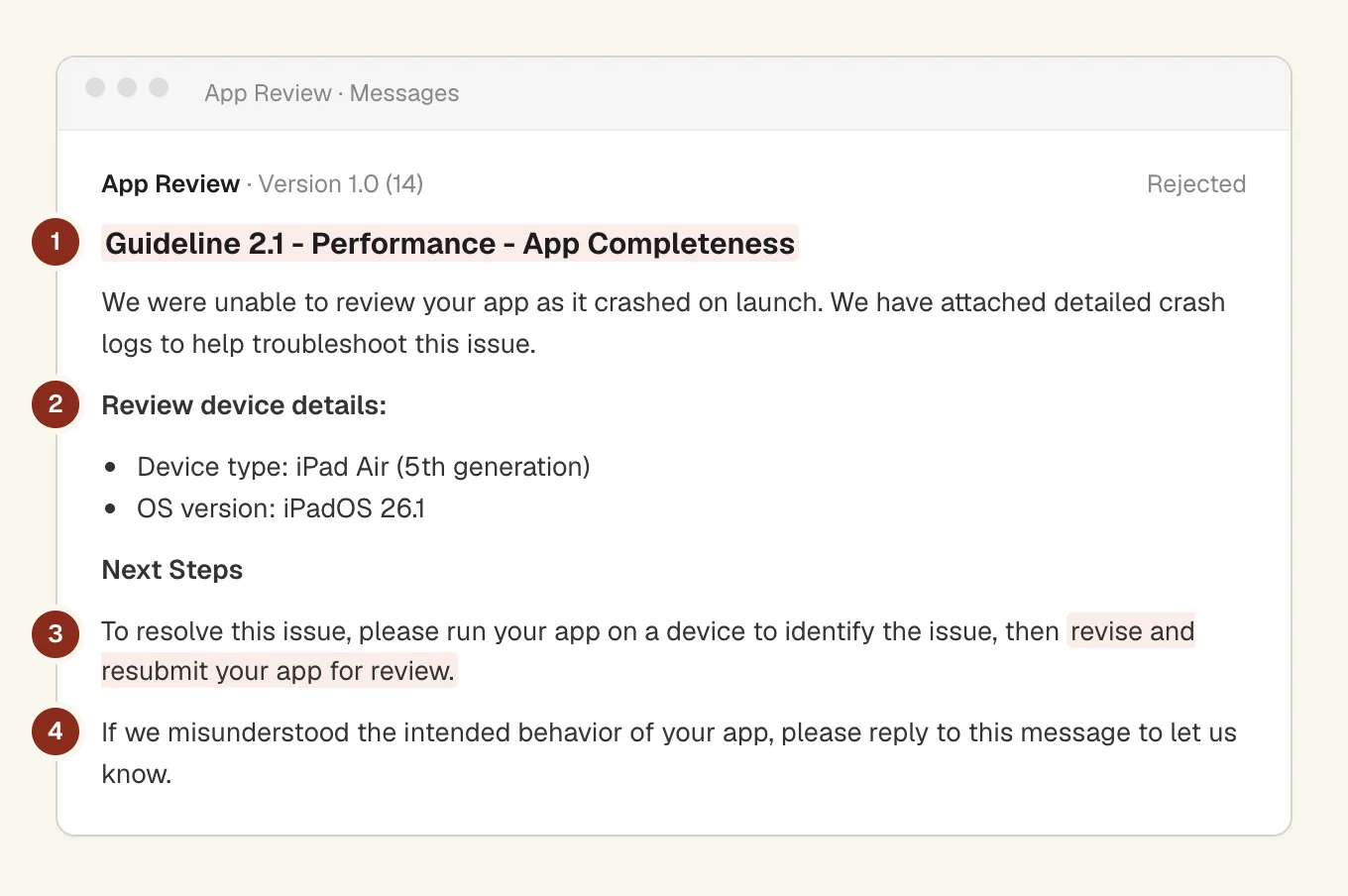
The message names the guideline and usually what the reviewer saw, often with a screenshot. Fix that one thing, then run through this page again, because one gap tends to sit next to another. Add a line to the notes saying what you changed. Resubmitting is normal. Apple's 2025 report counts 387,087 submissions approved after a rejection.
Questions people ask
What does guideline 2.1 App Completeness mean?
The app you send must be the finished version: no crashes, no placeholder content, working links, a live back end, and a demo account or demo mode if there's a sign-in. Part (b) adds that in-app purchases must be complete and visible to the reviewer. The full text is in Apple's guidelines.
Do I need a demo account for App Review?
Yes, if any feature needs a sign-in. Give a username and password that work on the day and won't expire, and put any sign-in code in the notes. If the app sells subscriptions, Apple asks for an account with an expired subscription.
Can I use a demo mode instead of a demo account?
Only in some cases. Apple allows a built-in demo mode for apps that handle sensitive information or are in a highly regulated industry, and the guideline says it needs Apple's prior approval. The demo mode has to show every feature.
Does Apple test on a real device?
Apple doesn't publish its test setup, but the guideline asks you to test on a device before you submit, and Apple rejects builds that crash or show obvious technical problems. Test the exact release build on a real device with the current iOS.
How do I reply to a 2.1 rejection?
Fix the issue the reviewer named, then submit again with a note on what you changed. If they couldn't get in, check the demo account still works and your back end is up. You don't need a new app record.