
On this page19 vs 18 at a glance
The short answer
PostgreSQL 19 was released on 19 November 2026. Compared with 18, the big additions are REPACK (which shrinks and reorders a table, and can do it without blocking reads or writes), plan advice for pinning query plans, WAIT FOR LSN for reading your own writes on a replica, INSERT ... ON CONFLICT DO SELECT for "get or create", and logical replication you can switch on without a restart.
Before you upgrade, know that JIT is now off by default, max_locks_per_transaction doubles to 128, standard_conforming_strings can no longer be turned off, and RADIUS authentication is gone. The full list is in the release notes.
PostgreSQL 19 vs 18 at a glance
PostgreSQL 18 shipped on 25 September 2025. Its headline was a new asynchronous I/O system, along with uuidv7(), virtual generated columns, OAuth sign-in and skip scans on multicolumn indexes (18 announcement). Version 19 builds on that work rather than replacing it. Most of what's new is about running a database day to day: cleaning up bloated tables, keeping plans steady, and making replicas easier to use.
| Area | PostgreSQL 18 | PostgreSQL 19 |
|---|---|---|
| Reclaiming table space | VACUUM FULL or CLUSTER, both lock the table | REPACK, and REPACK (CONCURRENTLY) without blocking reads or writes |
| Steady query plans | No built-in way | pg_plan_advice and pg_stash_advice modules |
| Read your writes on a replica | Poll the replay position yourself | WAIT FOR LSN |
| Get or create a row | ON CONFLICT DO NOTHING plus a second query | ON CONFLICT DO SELECT ... RETURNING |
| Start logical replication | Set wal_level = logical and restart | Raised to logical when you create the first slot |
| Replicate sequences | Not supported | FOR ALL SEQUENCES |
| I/O workers | Fixed io_workers, default 3 | Scales between io_min_workers and io_max_workers |
| JIT | On by default | Off by default |
| md5 passwords | Deprecated, warns when you set one | Warns after every md5 sign-in |
Sources: the 19 announcement, the 19 release notes and the 18 release notes.
REPACK replaces VACUUM FULL and CLUSTER
When rows are updated or deleted, PostgreSQL leaves dead space behind. Ordinary vacuum makes that space reusable, but it doesn't give it back to the operating system. Until now, the tools that did were VACUUM FULL and CLUSTER, and both hold a lock that stops all reads and writes on the table until they finish. On a big table that can mean a long outage, which is why many teams use the pg_repack extension instead.
PostgreSQL 19 adds a single built-in command, REPACK. It rewrites the table to reclaim the space and can reorder rows to match an index. The announcement says it replaces VACUUM FULL and CLUSTER, which both stay for compatibility. The examples from the docs:
REPACK employees;
REPACK employees USING INDEX employees_ind;
REPACK (CONCURRENTLY) employees USING INDEX;
With CONCURRENTLY, most of the work runs under a lock that still lets other sessions read and write. It takes the exclusive lock only for the final swap. The docs list some limits worth knowing before you plan a maintenance window around it:
- The table needs a primary key or an index-based replica identity. Partitioned and unlogged tables aren't supported.
- It can't run inside a transaction block.
- It needs free disk space of at least the table plus its indexes, because it writes a full copy.
- It fails if more than about 104 million rows are updated or deleted while it runs.
- It is not MVCC-safe. A transaction whose snapshot predates the swap, and that hadn't touched the table yet, can see it as empty.
If you run pg_repack today, this is the change most worth testing first: one less extension to install and upgrade.
Pinning query plans with plan advice
A query that ran fine for months can suddenly pick a worse plan after the data grows or statistics change. PostgreSQL has never had built-in hints to stop that. Version 19 adds pg_plan_advice, a module that describes the planner's key choices in a small "plan advice" language. You can use it to keep a plan you trust, or to try a plan the planner wouldn't pick on its own.
You load it with shared_preload_libraries, session_preload_libraries or LOAD. Then EXPLAIN (PLAN_ADVICE) prints the advice for the plan it chose, and you can feed some of it back. This is the example from the docs:
EXPLAIN (COSTS OFF, PLAN_ADVICE)
  SELECT * FROM join_fact f JOIN join_dim d ON f.dim_id = d.id;

 Generated Plan Advice:
   JOIN_ORDER(f d)
   HASH_JOIN(d)
   SEQ_SCAN(f d)
   NO_GATHER(f d)

SET pg_plan_advice.advice = 'JOIN_ORDER(f d)';
A second module, pg_stash_advice, stores advice and applies it automatically to queries with a matching query identifier, so you don't have to change application code. The docs are frank that overriding the planner "can easily backfire". Advice can only narrow the planner's choices. It can't force a plan the planner wouldn't consider at all.
Read your own writes on a replica with WAIT FOR LSN
The classic problem with read replicas: a user saves something, the next page reads from a replica, and the change isn't there yet because the replica is a few milliseconds behind. A common workaround is to send that user's reads to the primary for a while.
PostgreSQL 19 adds WAIT FOR LSN. After a write, the app asks the primary for its current WAL position (the log sequence number, or LSN). Before reading from the replica, it runs WAIT FOR LSN with that value, and the command returns once the replica has replayed that far.
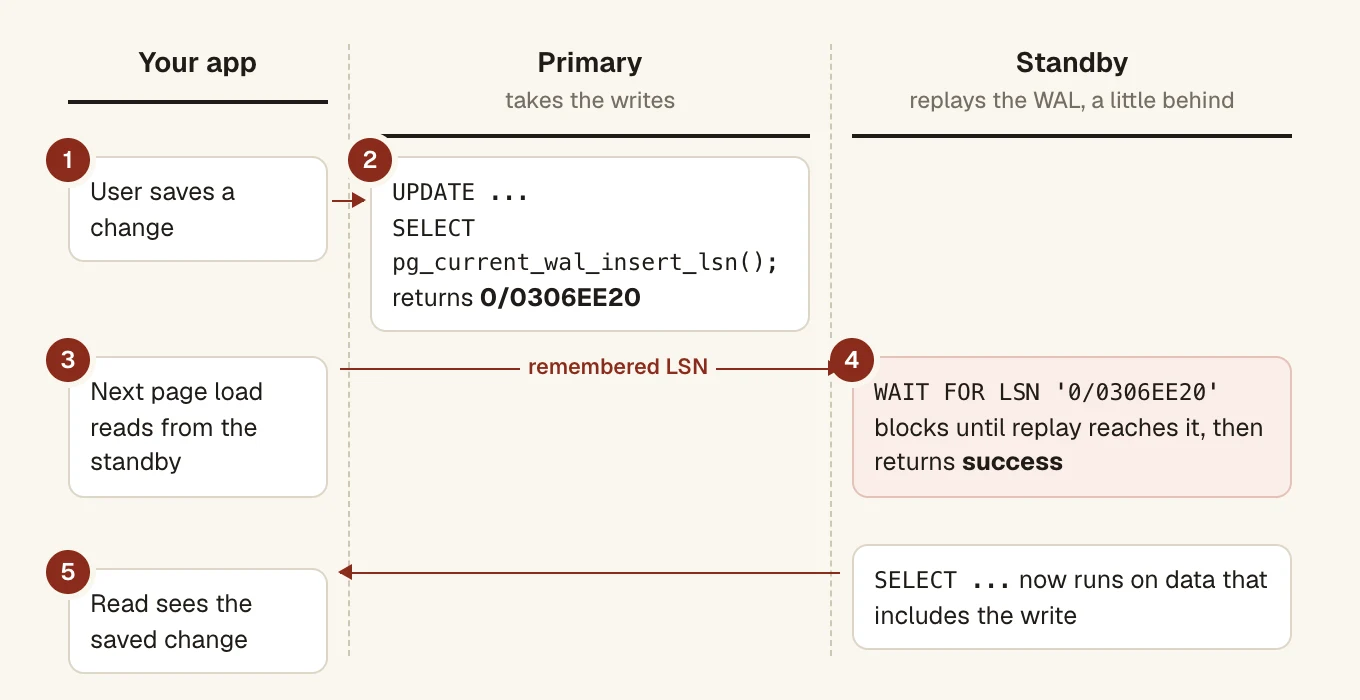
WAIT FOR LSN. The app remembers the primary's LSN after a write and makes the standby wait for it before reading. The LSN value is the one used in the docs example.From the docs:
-- on the primary, after the write
SELECT pg_current_wal_insert_lsn();   -- 0/0306EE20

-- on the standby, before the read
WAIT FOR LSN '0/0306EE20' WITH (TIMEOUT '100ms', NO_THROW);
It returns success, timeout or not in recovery. Without a timeout it waits for as long as it takes, and without NO_THROW a timeout raises an error, so set both for anything user-facing. It has to be a top-level command: you can't call it from a function, procedure or DO block. If your app already sends reads to replicas, we'd try this before any other feature in the release.
Logical replication without a restart
Before 19, using logical replication meant setting wal_level = logical and restarting the server. Now, if wal_level is replica, PostgreSQL raises the level to logical by itself when you create the first logical replication slot. A new read-only setting, effective_wal_level, shows the level actually in use.
Other replication changes since 18:
- Sequences replicate. CREATE PUBLICATION ... FOR ALL SEQUENCES carries sequence values over, one of the long-standing gaps when you move to a new server by logical replication. It needs a superuser.
- Publish everything but a few tables with
FOR ALL TABLES EXCEPT (TABLE users, departments). - Reuse foreign server settings.
CREATE SUBSCRIPTION ... SERVERtakes its connection details from a foreign server, such as one set up for postgres_fdw. - Update/delete conflicts are counted. With the subscription option
retain_dead_tuples, PostgreSQL detects an update that conflicts with a concurrent delete, and counts it in a newupdate_deletedcolumn ofpg_stat_subscription_stats. - postgres_fdw can copy statistics. Its new
import_statsoption makesANALYZEon a foreign table fetch the remote table's statistics instead of sampling its rows.
New SQL: ON CONFLICT DO SELECT, JSON output and more
Get or create in one statement
The usual way to "insert this tag unless it exists, then give me its id" takes two queries or an awkward CTE. In 19, ON CONFLICT DO SELECT returns the existing row when the insert conflicts. It needs a conflict target and a RETURNING clause. Add FOR UPDATE or FOR SHARE after DO SELECT to lock the row you get back.
INSERT INTO distributors (did, dname) VALUES (11, 'Global Electronics')
  ON CONFLICT (did) DO SELECT
  RETURNING *;
COPY to JSON
COPY gains a json format, one object per line. FORCE_ARRAY wraps the output in a single JSON array. It works for COPY TO only, not for loading.
COPY (SELECT * FROM (VALUES (1), (2)) val(id)) TO STDOUT (FORMAT JSON, FORCE_ARRAY);
[
 {"id":1}
,{"id":2}
]
Smaller additions
- Window functions
lead,lag,first_value,last_valueandnth_valueacceptIGNORE NULLS, written after the argument list and beforeOVER. Carrying the last known value forward no longer needs a trick. - SQL/JSON path expressions get string methods:
lower(),upper(),replace(),split_part(),btrim(),ltrim(),rtrim()andinitcap(). random(min, max)works on dates and timestamps, handy for test data:random('2000-01-01'::timestamptz, now()).json_array()over no rows now returns an empty array instead ofNULL.
Faster bulk inserts, smarter vacuum and I/O
The announcement doesn't promise a big across-the-board speedup this time. The gains are targeted:
- Foreign key checks got cheaper, which "in testing made bulk inserts nearly 2x faster", per the announcement. If you load data into tables with foreign keys, this is the one to measure.
- The planner turns
NOT INinto an anti-join when it can prove there are no NULLs, and can aggregate before a join (eager aggregation, controlled by enable_eager_aggregate). - I/O workers scale themselves. Version 18 introduced asynchronous I/O with a fixed pool of
io_workers(3 by default). In 19, withio_method = worker(still the default), PostgreSQL adjusts the pool between the new io_min_workers andio_max_workers. The oldio_workerssetting is removed. - LISTEN/NOTIFY scales better with many channels: a notification now wakes only the sessions listening to it.
Autovacuum
Autovacuum can now vacuum a table's indexes in parallel (autovacuum_max_parallel_workers, and autovacuum_parallel_workers per table). It picks which tables to vacuum first with a new scoring system, and you can see the scores in the new pg_stat_autovacuum_scores view. Ordinary queries can also mark pages all-visible as they read them, which saves vacuum some work.
Seeing what's going on
New views: pg_stat_lock for per-lock-type statistics and pg_stat_recovery for recovery status. EXPLAIN ANALYZE has a new IO option for asynchronous I/O, with a matching auto_explain.log_io setting. Full-page image bytes now appear in pg_stat_wal, EXPLAIN (ANALYZE, WAL) and vacuum logs. log_lock_waits is now on by default.
Security: TLS per hostname, md5 warnings, no more RADIUS
- SNI. One server can present a different TLS certificate depending on the hostname the client connects to. The mapping lives in a new pg_hosts.conf file.
- md5 nags harder. Version 18 deprecated md5 passwords and warned when you set one. Version 19 also warns after every successful md5 sign-in. You can silence it with
md5_password_warnings, but the better fix is to move to SCRAM, since md5 will be removed in a future release. - RADIUS is gone. PostgreSQL only supported RADIUS over UDP, which the release notes call "unfixably insecure".
- Password expiry warnings.
password_expiration_warning_thresholdwarns users when their password is about to expire, seven days ahead by default.
Defaults that change when you upgrade from 18
These are the ones that can change behaviour on a server you don't touch. All are in the migration section or the changes list of the release notes.
| Setting | 18 | 19 |
|---|---|---|
jit | on | off |
max_locks_per_transaction | 64 | 128 (same capacity as 64 before) |
default_toast_compression | pglz | lz4 on builds with LZ4 |
standard_conforming_strings | Can be off | Always on |
log_lock_waits | Off | On |
wal_compression = on | Always pglz | Best method available |
io_workers | 3 | Removed, see io_min_workers, io_max_workers |
| Parallel vacuum cost limit | Per worker | Shared, so parallel vacuum may run slower |
Two need action. If you run large analytical queries that relied on JIT, turn it back on, since the release notes say the cost estimates for when to use it proved unreliable. And if you raised max_locks_per_transaction yourself, double your value: lock allocation changed, so the same number now holds half as much.
Monitoring queries may also break on renames: sync_error_count in pg_stat_subscription_stats is now sync_table_error_count, and the BufferPin wait event is now BufferCleanup under type BUFFER.
What to check before you upgrade
As with every major version, moving to 19 takes a dump and restore, pg_upgrade, or logical replication. Version 18's pg_upgrade already keeps planner statistics, so you don't start with an empty slate. Check these first, because some of them stop pg_upgrade outright:
- Database, role or tablespace names with line breaks. They're no longer allowed, and
pg_upgraderefuses clusters that have them. - btree_gist indexes on inet or cidr columns. Those opclasses could skip rows that should match, so
pg_upgraderefuses them. The default opclass for these types is now GiST's own. - Dumps from older pg_dump with
standard_conforming_strings = offwon't load correctly. Take the dump with the version 19pg_dump. - Full text search and pg_trgm on ICU or builtin locales. They now classify characters with the database's locale provider instead of libc. After
pg_upgrade, reindex those indexes and recompute storedtsvectorvalues. - fuzzystrmatch indexes (
soundex,metaphone,dmetaphoneand friends) should be reindexed too. - MULE_INTERNAL encoding is removed. Those databases need a dump and restore into another encoding.
- RADIUS in pg_hba.conf has to go before you switch.
- postgres_fdw from read-only transactions.
READ ONLYnow carries over to the remote session, so those transactions can no longer change remote rows.
Then go through the upgrading chapter and the full migration list. It has 22 items, and most only matter if you write extensions or monitoring tools.
How long is PostgreSQL 19 supported?
Each major version gets fixes for five years. PostgreSQL 19 is supported until 19 November 2031. Version 18 runs until 14 November 2030, so there is no rush to move if 18 works for you. If you're on 14, it reached end of life on 12 November 2026 and won't get security fixes any more. Going straight to 19 makes more sense than stopping at 15.
How long each PostgreSQL version gets fixes
From first release to final release. The line marks 20 November 2026.
Questions people ask
When was PostgreSQL 19 released?
On 19 November 2026, announced by the PostgreSQL Global Development Group (announcement). The first release is 19.0.
Can I upgrade from PostgreSQL 18 to 19 with pg_upgrade?
Yes, pg_upgrade is supported, as are dump and restore and logical replication. It refuses clusters with line breaks in database, role or tablespace names, or with btree_gist indexes on inet or cidr columns, so fix those first.
Is VACUUM FULL removed in PostgreSQL 19?
No. REPACK replaces VACUUM FULL and CLUSTER, but both still work for compatibility. Only REPACK (CONCURRENTLY) avoids blocking reads and writes.
Why is JIT off by default in PostgreSQL 19?
The release notes say the cost estimates PostgreSQL used to decide when to compile a query proved unreliable. If you run many large analytical queries, set jit = on again and measure.
Does PostgreSQL 19 remove md5 passwords?
Not yet. md5 was deprecated in 18, and 19 warns after each successful md5 sign-in. It will be removed in a future release, so move to SCRAM.